Leonida Setup
Build from source on Windows, Linux, or macOS. There is no installer.
Prerequisite checklist
These nine rows are the README list. A tick is stored only in this browser tab. It does not install a tool and it does not mean the build will succeed.
The mark count is only for this browser tab. The build still has to be run on your machine.
| Requirement | Minimum | Required | README note |
|---|---|---|---|
| 1.0.2.1 | Required | Your own Xbox Series package, version 1.0.2.1. The folder holds MicrosoftGame.Config and the .rpf archives as plain files. The repository does not include that package. | |
| 10 | Required | Windows 10 or 11 x64 is the documented host for Build.bat and the runtime. Linux and macOS can run tools, with the runtime under Wine. | |
| 350 GB | Required | About 350 GB free for a full build. The assets stage is about 300 GB. --stages check,shaders,runtime needs about 30 GB. --work can point at another drive. | |
| 3.12 | Required | Python 3.12 or newer. On Windows, add python.exe to PATH. The terminal entry point is python -I make_game.py. | |
| 8 | Required | .NET 8 SDK, used by the asset tools. | |
| spirv-tools | Required | Vulkan SDK, for spirv-as and spirv-val. vulkaninfo is also how --wave64-emulate auto reads subgroup size. | |
| 21 | Required | LLVM 21 or newer with the AMDGPU target for llvm-mc. The stock Windows LLVM build has no AMDGPU target. Avoid 22.1.7 and 22.1.8 for the Linux cross build. | |
| 10.0.26100 | Required | Visual Studio 2022 with Desktop development with C++ and Windows SDK 10.0.26100 or newer, for the runtime stage. The runtime uses version 1.2 root signatures, which older SDKs do not declare. | |
| on-path | Optional | Optional on PATH. Required only when you pass --wav to decode XMA2 and Opus to PCM WAV, which uses much more disk. |
Commands for the selected OS
The easy path in the README is Windows: clone with the submodule, then double-click Build.bat. Linux and macOS use the same repository and python -I make_game.py. There is still no per-OS installer.
Install the toolchain
Python 3.12, the .NET 8 SDK, the Vulkan SDK, Visual Studio 2022 with the Windows SDK 10.0.26100, and an LLVM that includes AMDGPU. scripts\build_llvm_mc.ps1 builds llvm-mc.exe, needs git and the Visual Studio C++ tools, sets LLVM_MC, and takes about 20 to 40 minutes. Open a new terminal after it finishes. conda install -c conda-forge llvm-tools is the faster Windows option in the README. For WSL, set LLVM_MC to wsl -d Ubuntu -e /usr/lib/llvm-21/bin/llvm-mc.
scripts\build_llvm_mc.ps1Clone with the submodule
Download ZIP omits third_party/rpf9-explorer. The recursive clone includes it. If git exists, a ZIP checkout can still fetch the submodule later.
git clone --recursive https://github.com/ItsNotRexed/LeonidaRun Build.bat
Build.bat looks for your package in Downloads, Desktop, Documents, Games, your home folder, and the top of each drive, two folders deep. It checks free space and lists anything missing. Output goes to Documents\Leonida. A stopped build continues where it left off.
Build.batOr drive make_game.py yourself
--check only inspects the package. --find lists copies. --game and --out set the package and the output folder. --stages check,shaders,runtime is the smaller disk path.
python -I make_game.py --checkNative tools
The translator, asset tools, and Vulkan GPU test tools build and run natively. The README names RADV and NVIDIA as tested. llvm-mc on PATH is enough for the AMDGPU disassembler.
git clone --recursive https://github.com/ItsNotRexed/LeonidaCheck the package
python -I make_game.py --check uses the same finder as Windows. The runtime itself is Windows code. It cross-compiles with clang-cl and lld-link into runtime/build/windows when LLVM 19 or newer is present, except 22.1.7 and 22.1.8, and xwin has laid out the SDK in XWIN_DIR or ~/.local/share/xwin-sdk.
python -I make_game.py --checkUse a Windows runtime build
python3 -I make_game.py --runtime-build points at a Windows build made elsewhere, such as the runtime-windows artifact. The script copies gta6rt.exe and gta6rt_tls_host.dll into --out and writes gta6rt.sh, which starts the exe with wine or with the Wine named by WINE.
python3 -I make_game.py --runtime-build ~/Downloads/runtime-windowsVulkan pipeline check
With CMake 3.24 or newer, a C++20 compiler, and the Vulkan headers, the pipelines stage uses vk_pipeline_check under runtime/build/linux. Pass the directory that holds index.json and the translated SPIR-V. make_game.py builds that tool itself when it is missing.
cmake -S runtime -B runtime/build/linux
cmake --build runtime/build/linux --parallel
./runtime/build/linux/vk_pipeline_check /path/to/spirvKeep the disassembly files
Do not delete work/shaders/dxbc/disasm together with work/shaders/spirv/index.json. That can make the shaders stage look finished with zero shaders. A disasm folder that is a symlink is refused when the stage has to clear it.
python -I make_game.py --stages check,shaders,runtimeApple Silicon tools
Python tools and the Vulkan test tools run natively on MoltenVK from Homebrew or on KosmicKrisp. The runtime is still Windows code and follows the Linux path under Wine.
git clone --recursive https://github.com/ItsNotRexed/LeonidaWine for the runtime
CrossOver, arm64 with FEX, or x86-64 under Rosetta are the routes named in the README. Known gaps: no geometry stage and no VK_EXT_mesh_shader, so those tests are skipped. Subgroups are 32-wide, so wave64 shaders run emulated.
python -I make_game.py --checkDisk budget
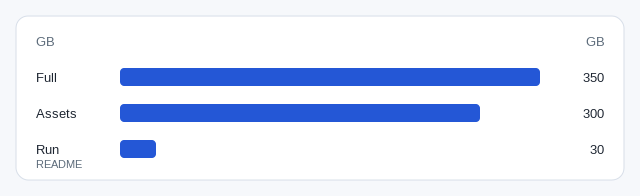
The 350 GB figure is the full build. Assets are the large part. The bar splits that README budget into the assets stage and the smaller check, shaders, and runtime path. It is not a live reading of your disk.
Full build350 GBAssets stage300 GBcheck, shaders, runtime30 GB
Stage order
make_game.py runs the stages in this order. --stages can name a subset, and a stopped build continues where it left off.
check
Recognises package 1.0.2.1 from file sizes and lists missing tools before anything is compiled.
shaders
The longest stage. It uses --jobs processes, half the CPU threads by default, and keeps the extracted shader inputs if llvm-mc changes.
assets
Exports models and textures for the asset tools. This is the about 300 GB part of a full build.
runtime
Builds the Windows loader. On Linux it is left out of the default stages until clang-cl, lld-link, and the xwin SDK are present.
pipelines
Creates each translated shader on the current GPU driver, reports skips, and writes pipeline_cache.bin in --out. The runtime does not load that cache.
Terminal commands
Build.bat is the Windows double-click. The same make_game.py entry point takes the flags printed in the README.
| Command | Effect |
|---|---|
python -I make_game.py --find | Lists the package copies the finder sees on this PC. |
python -I make_game.py --pick | Opens a folder dialog so you can point at the package. |
python -I make_game.py --check | Checks the copy and builds nothing. |
python -I make_game.py --check --full-check | Also compares the SHA-256 of every package file. The README marks this as slow. |
python -I make_game.py --game "D:\path\to\your\package" --out "D:\Games\Leonida" --work "E:\leonida-work" | Sets the package folder, the output folder, and a work drive that has the free space. |
python -I make_game.py --stages check,shaders,runtime | Skips the assets stage. The README puts this path at about 30 GB. |
python -I make_game.py --game "D:\path\to\your\package" --wav | Also decodes repackaged Ogg Opus to 16-bit PCM WAV, which is several times larger. |
python -I make_game.py --wave64-emulate off | Forces native wave64. The default is auto, which asks vulkaninfo, and on forces emulation. |
Setup blockers already written down
The README already names these four setup failures. Open a row for the cause.
Stock Windows LLVM has no AMDGPU
llvm-mc needs the AMDGPU target. The official Windows LLVM build does not include it. Use scripts\build_llvm_mc.ps1, conda-forge llvm-tools, or llvm-mc from WSL with LLVM_MC set to the full command.
Skip LLVM 22.1.7 and 22.1.8
The README calls out those two point releases for the Linux cross build. The runtime notes say clang-cl and lld-link want LLVM 19 or newer, but not 22.1.7 or 22.1.8.
Zero shaders can look like success
Deleting the .s files in work/shaders/dxbc/disasm along with the translated index can leave the shaders stage looking finished with zero shaders.
AMD emulated LDS
On AMD's Windows driver, auto uses native wave64 on RDNA1 and RDNA2 when the runtime GPU supports it. Emulated LDS is a known crash path. --wave64-emulate defaults to auto.
Output and save location
The default output folder is Documents\Leonida. --out and --work can move that to another drive. A read-only package drive needs gta6rt --overlay with a writable folder. --overlay is a gta6rt option, not a make_game.py option. Nothing here is a playable save game. The port does not boot.
Compatibility